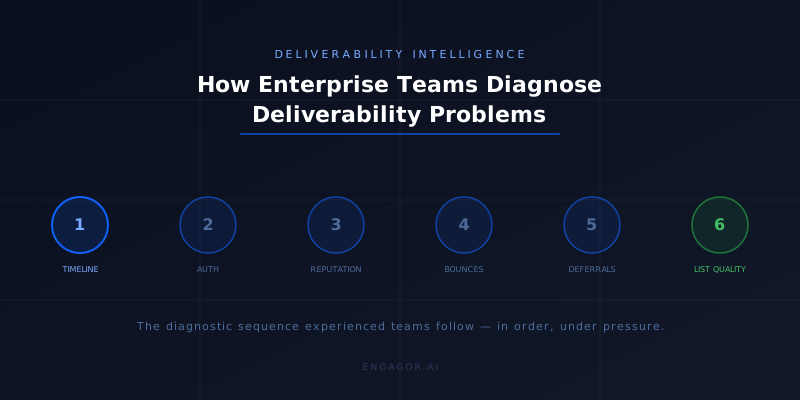
Deliverability problems are rarely self-explanatory. A bounce rate increase, a drop in open rates, a complaint from a business unit that their campaigns are underperforming: these are symptoms. The cause is almost always somewhere else, in a signal you were not watching, in a pattern that built over days before it became visible.
This article describes the diagnostic process that experienced enterprise deliverability teams follow when something goes wrong. Not the theory of what should happen, but the actual sequence of steps, the tools consulted in practice, the decisions made under uncertainty, and the points at which manual investigation runs out of road.
This is not a beginner's guide to deliverability. It assumes you understand SPF, DKIM, DMARC, and basic reputation concepts. It is written for practitioners who already know what the tools are and want to understand how to use them in sequence under pressure.
A scenario that will be familiar: a financial services company sending across four ESPs notices on a Monday morning that complaint rates for the previous week were elevated. The team has data from each ESP's dashboard, a Postmaster Tools report from Friday, and a partial export from their MTA. None of these sources are in the same format. The investigation that follows takes most of the day. By the time the root cause is identified, a weekend of sending has already gone out under the same conditions that caused the problem. The steps below describe the process that experienced teams follow to compress that timeline.
Step 1: Establish what changed and when
Every deliverability investigation begins with a timeline. What metric moved, in which direction, starting when, and affecting which traffic.
This sounds straightforward. In practice it is often the hardest part of the investigation, because the answer requires data from multiple sources that are not synchronized.
The first question is scope. Is this problem affecting all traffic, or a subset? All providers, or specific ones? All sending domains, or specific subdomains? All ESPs, or one? Narrowing the scope is the single most valuable thing you can do in the first fifteen minutes of an investigation, because a problem that affects all traffic has a different set of likely causes than one that affects only Gmail, or only one subdomain, or only one ESP.
For organizations sending across multiple ESPs and domains, answering the scope question requires pulling data from each source and comparing. An ESP that shows a clean delivery rate while Gmail specifically is throttling will look fine in the dashboard until you look at provider-level breakdown. A subdomain reputation problem will not appear in aggregate metrics until the volume on that subdomain is large enough to move the aggregate.
The timeline question matters because deliverability problems rarely start on the day they are noticed. Reviewing the preceding two to four weeks of data, not just the past 24 hours, almost always reveals the beginning of the pattern. That earlier inflection point is where the useful diagnostic information lives.
Step 2: Check authentication first
Before investigating reputation or content, confirm that authentication is intact. This step takes five minutes and eliminates a category of causes that can produce symptoms identical to reputation problems.
SPF alignment should be clean for all sending domains and subdomains. A common failure mode is an ESP or third-party tool added to the sending stack without a corresponding SPF record update. The symptoms are delivery failures that appear to be reputation-based but are actually authentication failures.
DKIM signatures should be present and verifiable. DKIM failures can occur after DNS changes, key rotations done incorrectly, or subdomain configurations that do not have signing keys set up. Google Postmaster Tools provides authenticated traffic percentages, which will drop if DKIM is failing on a significant proportion of traffic.
DMARC alignment should be passing for both SPF and DKIM where possible. A DMARC policy at p=quarantine or p=reject will cause delivery failures if authentication is not aligned, and those failures can be mistaken for reputation problems.
MXToolbox and similar tools can check DNS records in real time. Google Postmaster Tools shows authenticated traffic percentage with a short delay. These checks should take less than ten minutes and should be the first ten minutes of any investigation.
Step 3: Consult reputation signals
With authentication confirmed, the next layer is reputation. The tools available differ by provider.
For Gmail traffic, Google Postmaster Tools shows spam rate, domain reputation (while it remains available), and IP reputation if you have dedicated IPs registered. The spam rate is the most actionable metric: a rate above 0.10% is a signal worth investigating, and a rate approaching 0.30% indicates a serious problem. Postmaster Tools data has a delay of one to two days, which means you are looking at a recent historical picture, not the current state.
For Microsoft traffic, SNDS provides IP-level reputation data including spam trap hits and filtering status. SNDS is the most direct signal available for Microsoft deliverability issues. An IP showing red status in SNDS is being filtered or blocked. Spam trap hits in SNDS indicate list quality problems that need to be addressed before reputation will recover.
For other providers, monitoring is less systematic. Blocklist checks against major lists (Spamhaus, Barracuda, SURBL) are relevant for IP and domain reputation across a wide range of receiving systems. MXToolbox provides consolidated blocklist checking. A blocklisted IP or domain will generate delivery failures across many providers simultaneously.
The key discipline at this step is to look at each provider's signals separately. A reputation problem at Microsoft does not necessarily mean a problem at Gmail. A blocklist hit affecting one IP does not necessarily affect all sending IPs. Conflating signals from different sources produces incorrect diagnoses.
Step 4: Look at the bounce codes
If authentication is clean and reputation signals are not showing an obvious cause, the next step is a detailed look at bounce codes from the affected traffic.
Bounce codes tell you what the receiving server decided and, in many cases, why. A 550 5.7.1 with a message referencing the Spamhaus Policy Block List tells you exactly what the problem is. A 550 5.7.606 from Microsoft tells you the sending IP is on a Microsoft-managed block list and provides a URL for the junk mail reporting program. A 421 with text referencing sending limits tells you the server is throttling, which points toward volume or reputation pressure rather than a policy block.
The challenge is that bounce codes require volume to be diagnostic. A single 550 from any provider is almost meaningless in isolation. The pattern across thousands or millions of messages — what codes are appearing, in what proportions, from which receiving domains, on which sending IPs — is where the diagnostic information lives.
This is the step where manual analysis becomes genuinely difficult at scale. Grouping, counting, and comparing bounce codes across a day's worth of traffic from a multi-ESP environment is a data engineering task, not a dashboard query. Teams without tooling that automates this step typically end up looking at samples and making inferences rather than analyzing the full pattern.
Step 5: Check deferral patterns
For organizations with MTA-level visibility, deferral patterns are worth examining before or alongside bounce codes. The pattern of 4xx responses from specific providers carries diagnostic information that precedes changes in delivery rates.
At this step, the question is whether deferral rates at specific providers have changed relative to baseline. A sustained increase in 421 responses from Microsoft that started before the bounce rate increased is strong evidence that Microsoft's infrastructure was signaling a problem before it escalated to permanent rejections. That timeline shifts the investigation toward what changed in the sending pattern or list quality in the days before the throttling began.
Step 6: Examine list quality
If authentication is clean, reputation signals point toward complaints or spam trap hits, and bounce codes show elevated 5xx rates, the investigation turns to list quality.
List quality problems produce predictable patterns. A segment of old, unvalidated, or purchased addresses generates hard bounces at rates significantly above the rest of the list. The hard bounce rate for that segment may be 10 to 30 times higher than for recently acquired, opted-in contacts. Isolating that segment and comparing its performance to clean segments identifies the source of the problem.
Engagement-based segmentation is relevant here. Addresses that have not opened or clicked in twelve months or more are both more likely to have degraded (addresses abandoned or converted to spam traps) and more likely to generate complaints from recipients who do not remember opting in. The combination of low engagement and high complaint rate in a segment is a reliable indicator of a list quality issue rather than a content or authentication issue.
Where manual investigation ends
The process above describes what a skilled, experienced deliverability team does. It works. It also has significant limitations.
It is slow. Going through the steps above manually, pulling data from each tool, normalizing it enough to compare, drawing inferences from incomplete data, takes hours even for an experienced practitioner. For a team managing significant volume, hours of degraded delivery during the investigation represent real business impact.
It is reactive. The investigation begins when a problem is noticed. The problem was usually building before it was noticed. The gap between when the problem started and when it was noticed is time during which the reputation damage accumulated.
It is incomplete. No human analyst can monitor every source, every provider, every subdomain, every IP, continuously. The signals that are checked are the signals that the analyst thought to check. The signal that identified the root cause might not be one that was on the checklist.
These limitations are not a reflection of practitioner skill. They are structural characteristics of a diagnostic process that requires manually assembling data from systems that were not designed to work together. Addressing them requires changing the architecture of how signals are collected and analyzed, not improving the skill of the people doing the analysis.
The architecture that addresses these limitations is what separates a deliverability tool from a deliverability intelligence platform. The short version is that continuous, cross-source, automated signal correlation is the only approach that consistently surfaces problems earlier than manual investigation does, and that the combination of that automation with human expertise — rather than one or the other alone — is what produces the fastest time-to-diagnosis in practice.
Frequently asked questions
How do you diagnose an email deliverability problem?
Start by establishing scope: which providers, which sending domains, and which traffic segments are affected. Confirm authentication is intact before investigating reputation. Consult provider-specific reputation tools: Google Postmaster Tools for Gmail, SNDS for Microsoft, blocklist checks for broader coverage. Examine bounce codes in volume to identify patterns. If MTA-level data is available, review deferral patterns for early signals. Finally, examine list quality for the affected segments. The sequence matters because each step narrows the diagnostic space before the next.
Why is email deliverability hard to diagnose?
Deliverability diagnosis is hard because the relevant signals are distributed across systems that do not automatically communicate. ESP dashboards show delivery outcomes but not the causes. Reputation tools show reputation but with a delay and in provider-specific formats. MTA logs show SMTP-level detail but require infrastructure access and pattern analysis to interpret. Assembling a complete picture requires pulling data from each source, normalizing it, and looking for correlations that no single tool surfaces automatically.
What should I check first when email deliverability drops?
Authentication first, always. SPF, DKIM, and DMARC alignment failures can produce symptoms identical to reputation problems, and they take five minutes to check. If authentication is clean, scope the problem by provider and sending domain before going deeper. A problem affecting only one provider or one subdomain has a different set of likely causes than one affecting all traffic.
What is an Agentic Email Intelligence Platform?
An Agentic Email Intelligence Platform, or AEIP, is a system that performs the cross-source signal correlation described in this article continuously and automatically, rather than as a manual process initiated when a problem is noticed. The practical effect on the diagnostic process is significant: instead of a practitioner working through each source in sequence and assembling a picture over hours, the AEIP has already correlated the available signals and surfaced a structured finding that identifies where in the sequence the problem originated. The practitioner's time moves from data assembly to analysis and remediation.
Continue reading
This article is part of a five-part series on email deliverability intelligence.