Why experienced email operators are losing patience with Outlook's opaque blocking, and what you can actually do about it.
If you've spent any time managing email infrastructure, you've probably seen this message:
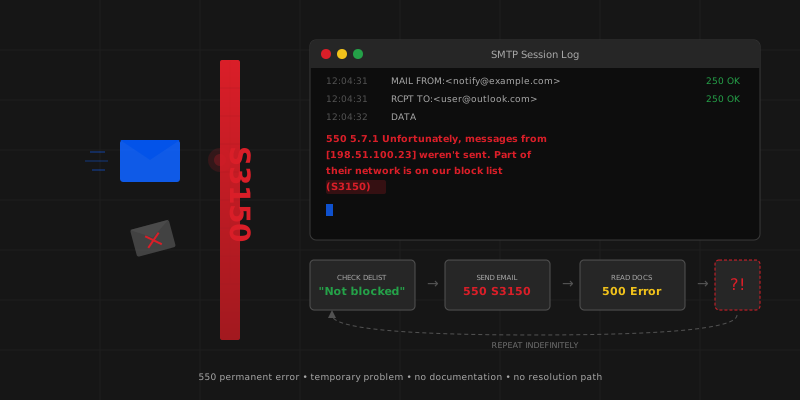
550 5.7.1 Unfortunately, messages from [x.x.x.x] weren't sent. Please contact your Internet service provider since part of their network is on our block list (S3150).
And if you've seen it, you've probably also experienced what comes next: confusion, frustration, and a support process that feels designed to exhaust you into giving up.
S3150 has been a recurring source of pain across the email operations community for years. But in late 2025 and early 2026, frustrations reached a boiling point. Here's what happened, why it matters, and what you can realistically do when it hits you.
What Is S3150, Exactly?
That's the first problem: nobody is entirely sure.
Microsoft's own error reference page doesn't mention S3150. The link included in the bounce message (mail.live.com/mail/troubleshooting.aspx#errors) has been reported to redirect multiple times before landing on a 500 Internal Server Error. So you receive a rejection pointing you to documentation that either doesn't exist or doesn't load.
What the community has pieced together over years of discussion:
- S3150 is associated with IP-level blocking by Microsoft's Protocol Filter Agent (PFA)
- It's returned as a 550 (permanent) error, even though the underlying cause may be temporary
- The delist portal (sender.office.com) sometimes reports "not blocked" while the rejections continue
- It can be triggered at surprisingly low volumes, including single-digit emails per day
That last point is important. S3150 is not exclusively a bulk sender problem.
When the Mailop List Itself Got Blocked
In December 2025, something almost poetic happened: Microsoft's S3150 filter blocked the mailop mailing list server itself.
Mailop, for those unfamiliar, is the primary mailing list where email operators, postmasters, and deliverability professionals discuss operational issues. It's been running for over two decades. Its subscribers include people from every major mailbox provider, ESP, and anti-spam organization in the world.
The list administrator reported the block, noting that the troubleshooting link in the error message was returning a 500 error, making it impossible to even begin the remediation process. Subscribers using Outlook, Hotmail, and Live.com addresses had their subscriptions suspended.
When the internet's most respected email operations community can't deliver mail to Microsoft, you know there's a systemic issue worth discussing.
The Recurring Pattern
The S3150 discussion that erupted on mailop in February 2026 was not an isolated incident. It followed the exact same pattern that has played out dozens of times over the years:
Step 1: An experienced operator reports being blocked by S3150, despite clean sending practices, valid authentication, and low volume.
Step 2: They check the delist portal. It says they're not blocked. The rejections continue.
Step 3: They ask the community for help.
Step 4: Someone with knowledge of Microsoft's systems explains that it's likely throttling-related, and suggests slowing down delivery.
Step 5: The original sender points out that they're already sending at extremely low volumes. One sender in the February thread was sending fewer than 1,500 messages per day. A previous case from October 2025 involved single-digit emails per day. "Slow down" doesn't help when you're barely sending.
Step 6: The conversation escalates as multiple people share similar experiences. Frustration builds. The list moderator steps in to keep things civil.
Step 7: Nothing structurally changes. The cycle repeats weeks or months later.
The Core Frustrations
After reading through multiple S3150 threads spanning years of community discussion, a few consistent pain points emerge:
1. Permanent error codes for temporary problems
S3150 returns a 550 (permanent failure). In SMTP, that means "don't retry." But the underlying issue often resolves itself, or can be resolved through the delist portal. Returning a 5xx code for what is essentially a throttling or temporary reputation issue breaks the fundamental contract of SMTP error classification. It causes downstream systems to generate bounce notifications, suppress addresses, and mark deliveries as permanently failed when they're not.
2. Undocumented thresholds
The community has never been able to establish clear, documented rate limits for Microsoft's consumer mail platforms. Without published thresholds, the advice to "slow down" is impossible to act on. Slow down to what? There's no number to target. Every sender is left guessing.
3. Self-service tools that contradict reality
Being told your IP is on a blocklist, checking the official delist portal, being told you're not blocked, and continuing to receive blocks is a genuinely maddening experience. It erodes trust in the remediation process and leaves senders with no actionable path forward.
4. Transactional mail caught in the crossfire
This isn't just a bulk sender issue. Signup confirmations, password resets, and account notifications are being blocked alongside marketing campaigns. For platforms hosting hundreds or thousands of communities (like forum software), the impact cascades: their users can't sign up, can't reset passwords, and can't receive critical notifications. The platform gets blamed for something entirely outside their control.
5. Microsoft's representative operates under constraints
It's worth noting that Microsoft does have a representative who participates in the mailop community. This person does their best to provide guidance and context, but clearly operates within significant corporate constraints. The frustration from senders is not directed at any individual. It's directed at a system that feels opaque, inconsistent, and unresponsive to legitimate concerns.
What You Can Actually Do
Let's be practical. If S3150 hits you, here's a realistic action plan:
Verify your authentication first. SPF alignment, DKIM signing, and DMARC policy should all be in place and passing. This won't fix S3150 directly, but it eliminates the most common contributing factors.
Check SNDS (Smart Network Data Services). Sign up at sendersupport.olc.protection.outlook.com/snds/ and monitor your IP reputation. It's not always accurate (community members have reported clean SNDS data while being blocked), but it's the best signal available.
Submit a delist request anyway. Even if sender.office.com says you're not blocked, submit the form. Multiple community members report that this can trigger a review process that eventually resolves the issue, sometimes within 24-48 hours.
Separate your mail streams. If you're sending both transactional and marketing email from the same IP, consider splitting them. Microsoft's filtering appears to evaluate IP reputation holistically. A few bad marketing sends can poison the well for your transactional mail.
Implement proper retry logic. Despite S3150 being a 550 error, many experienced operators treat it as a temporary issue and retry after a delay. This goes against SMTP conventions, but pragmatism sometimes wins over protocol purity.
Document everything. Keep logs of your sending volume, the error messages, your authentication status, and your SNDS data. If you need to escalate through Microsoft's support channels (or through contacts in the community), having a clear paper trail helps.
Be patient, unfortunately. The most honest advice from experienced operators: S3150 blocks often resolve themselves within days. Not because anything was done differently, but because Microsoft's systems re-evaluated the reputation. That's cold comfort when your users can't receive password reset emails, but it is the reality of the situation.
The Bigger Picture
Microsoft processes an enormous volume of inbound email across Outlook.com, Hotmail, and Live.com. Aggressive filtering is, to some degree, necessary. No one in the email operations community disputes that.
But there's a meaningful difference between aggressive filtering and opaque filtering. Gmail's Postmaster Tools provide clear reputation signals. Yahoo publishes their requirements. Microsoft's approach remains uniquely frustrating because the feedback loop between "you've been blocked" and "here's what to fix" is either broken, contradictory, or simply absent.
The email community has been raising these concerns, politely and repeatedly, for years. The frustration you see on mailing lists isn't entitlement. It's experienced professionals who have been doing this for decades, running into the same wall over and over, with no clear path to resolution.
If you're dealing with S3150 right now, know that you're not alone, you're probably not doing anything wrong, and the community has your back. Even if Microsoft's documentation doesn't.
This post is based on public discussions from the mailop mailing list community, spanning multiple threads from 2020 through February 2026. No private communications were used. Engagor monitors deliverability signals across all major mailbox providers. If you're dealing with opaque blocking issues across multiple ESPs, that's exactly the kind of problem we built our platform to help diagnose.