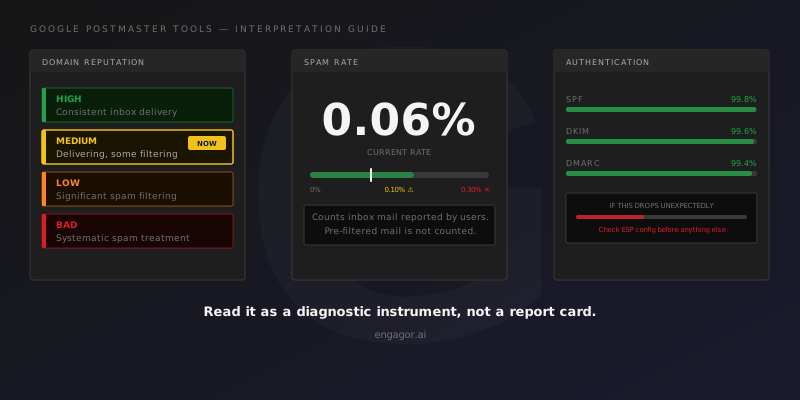
You pull up Postmaster Tools on a Tuesday morning. Domain reputation is Medium. Spam rate is 0.06%. Delivery errors shows nothing. You close the tab feeling reasonably confident. Two days later you get a message asking why the last campaign landed poorly at Gmail.
This pattern repeats more than it should. Postmaster Tools is the most important free diagnostic instrument for Gmail deliverability, and Gmail represents 40 to 60 percent of a consumer list in most markets. But the data arrives with delays, at aggregation levels that hide important detail, and with a four-word vocabulary (High, Medium, Low, Bad) that has specific operational meaning the interface does not explain.
This is not a beginner's guide to what Postmaster Tools is. Google's own documentation covers that. This article is the interpretation layer: what specific readings mean, what the known limitations are, and how to use GPT data in context rather than in isolation. It assumes you are already checking these dashboards and want to read them more precisely.
The seven dashboards and what they measure
Postmaster Tools organises its data into seven sections: Spam Rate, Domain Reputation, IP Reputation, Authentication, Encryption, Delivery Errors, and Feedback Loop. Each section measures something different. Each has its own data availability requirements and update schedule.
Spam Rate
Spam rate measures the proportion of mail delivered to Gmail users' inboxes that those users subsequently marked as spam. The word "delivered" matters here. The metric counts mail that reached the inbox and was then reported. Mail that Gmail filtered to spam automatically before a user saw it does not enter the calculation. Mail that was blocked outright does not count either. The denominator is delivered inbox mail, not all attempted mail.
This creates a situation that trips up a lot of practitioners: low spam rate does not confirm good inbox placement. A sender whose mail is being routed to spam automatically will show a low spam rate precisely because fewer users are exposed to the messages. If you suspect poor inbox placement and Postmaster Tools shows a clean spam rate, those two things are not contradictory. The low spam rate may be a consequence of the filtering, not evidence against it. Confirming inbox placement requires seed testing against a real panel, not spam rate data.
Google's published guidance treats 0.10% as a warning threshold and rates approaching 0.30% as a serious signal that will start affecting deliverability systemically. Apply these as rolling averages over days or weeks, not as single-day thresholds.
One thing spam rate cannot tell you: which segment, campaign, or subdomain is driving complaints. The metric is aggregated at the root sending domain level. Identifying the source requires correlating with ESP event data and segment-level analytics.
Domain Reputation
Domain reputation uses four values (High, Medium, Low, Bad) and each maps to a distinct operational state.
High means Gmail consistently delivers your mail to the inbox. The domain is in good standing.
Medium means Gmail is delivering your mail but some filtering is occurring. It is not a critical state. A domain that has been at Medium for a short time following a period of High is often in recovery from a specific sending event. A domain that has sat at Medium for several weeks without an identifiable cause is worth investigating.
Low means Gmail is filtering a meaningful proportion of your mail to spam. This requires action. The most common causes are sustained complaint rates above the warning threshold, spam trap hits, or sending volumes that have outpaced list quality. Left unaddressed, a domain at Low does not recover on its own. The complaint or trap activity that pushed it there will continue, and the reputation will continue to decline.
Bad means Gmail is treating your mail as spam across essentially all recipients. Getting out of Bad requires stopping the practices that caused the problem: suppress the segments responsible for the complaint activity, clean whatever list quality issue produced trap hits, and then wait. Recovery from Bad takes weeks. The clock does not start until the underlying problem has actually stopped.
One caveat on data availability: domain reputation only appears when Postmaster Tools has sufficient data volume to generate a classification. Low-volume senders and new sending domains often see "No data available." This is not the same as Low reputation. It means the sample is too small to classify. If you are debugging a delivery problem and this field shows no data, look at MTA logs and authentication signals first.
IP Reputation
IP reputation uses the same four-value scale applied to your sending IP addresses. This dashboard is only relevant for dedicated IP users. Shared IP senders will see limited or no data here because their IPs are shared across multiple sending programs.
The relationship between IP reputation and domain reputation is diagnostically useful. Both declining together points to a systemic problem across your sending infrastructure. Domain reputation declining while IP reputation holds steady is more consistent with sending practice or list quality issues than with infrastructure failure. IP reputation declining while domain reputation remains stable suggests the problem is isolated to specific IPs, often because those IPs carry traffic that differs from the rest of the program.
Authentication
This section shows the percentage of mail passing SPF, DKIM, and DMARC checks among mail delivered to Gmail. For a properly configured program, all three should be at or very close to 100%.
A drop in authenticated traffic percentage is one of the fastest signals that something has broken in authentication configuration. A new ESP added to your sending stack without an SPF record update, a DKIM key rotation that did not complete cleanly, a new subdomain that went out without full configuration: all of these will appear here before they cause significant delivery failures. When an unexplained delivery problem surfaces, check authentication first. It takes five minutes and eliminates an entire category of root causes.
Delivery Errors
Delivery Errors shows SMTP response codes returned when Google's servers reject or defer mail from your sending IPs.
421 responses are temporary deferrals. Google is telling your infrastructure to retry. A single-day spike in 421 activity that resolves is usually a volume event, either a send volume that temporarily triggered flow control or a transient issue on Google's end. Persistent 421 activity building over several days is a different signal: it suggests that reputation has degraded enough for Google to apply ongoing rate limiting against your IPs or domain.
550 responses are permanent rejections. Google is refusing the mail, not deferring it. Sustained 550 activity warrants direct investigation into what is being rejected and why. 550 responses from Gmail most often indicate that specific content, authentication state, or IP status has crossed a threshold for permanent filtering.
Feedback Loop
The Feedback Loop section covers Gmail FBL data, but only for sending programs that have completed Google's registration process and configured the FBL properly. An empty Feedback Loop section does not confirm that no complaints are occurring. It may mean your registration setup is incomplete. Confirming that your FBL integration is functioning before drawing conclusions from an empty dashboard is worth the five minutes it takes.
What Postmaster Tools does not tell you
Postmaster Tools covers Gmail traffic only. It has nothing to say about deliverability at Microsoft, Yahoo, Apple, or any other provider. A program with clean GPT data can have serious problems at Outlook. Those problems will not appear here.
Data is delayed by one to two days. On Wednesday you are looking at Monday's picture. For a problem developing in real time, you need MTA logs and ESP event streams, not Postmaster Tools.
Postmaster Tools tracks reputation at the exact domain in the From: header. Sending from marketing.example.com and sending from example.com are treated as separate entities, each requiring its own registration via DNS verification. They do not roll up into each other. The practical risk here is blind spots: if you send from a subdomain you have not registered in Postmaster Tools, that traffic is completely invisible in GPT. Not aggregated under the root domain, simply absent. For a program sending from multiple subdomains, each one needs its own registration to maintain full visibility.
And Postmaster Tools cannot explain why Gmail made any specific filtering decision. The models determining inbox versus spam placement at Gmail are not documented and are not accessible from the sender side. GPT shows outcomes and reputation signals. It does not show decision logic. Reading it as an explanation rather than a symptom is where most GPT-based investigations go wrong.
Using Postmaster Tools alongside other data sources
The most useful correlation in practice involves spam rate in GPT and complaint data from your ESP's feedback loop. If GPT spam rate is rising while your ESP feedback loop data shows flat complaint rates, that discrepancy points toward a segment or subdomain that sits outside your ESP's feedback loop coverage. That is the segment to investigate first.
The second correlation worth establishing is between reputation changes in GPT and delivery event data from your MTA or ESP. A domain reputation shift from High to Medium in Postmaster Tools, timed against an increase in deferrals from Gmail servers visible in your MTA logs, is a coherent signal: the reputation changed, and the delivery consequence shows up in the event stream. The GPT data shows the reputation. The MTA data shows the delivery impact as it unfolds. Neither alone is enough to act on confidently. Together they establish a cause-and-effect timeline.
Manual correlation doesn't scale.
Engagor's autonomous AI continuously monitors your email deliverability across every ISP and ESP — detecting problems as they develop, so your team spends time on strategy instead of dashboard rotation.
Microsoft SNDS is the Postmaster Tools equivalent for Outlook traffic. Running both together gives you visibility into the two providers that represent the majority of consumer email volume in most markets. When reputation signals decline at both providers around the same time, the cause is usually in sending practices or list quality. When one declines while the other holds steady, the cause is usually provider-specific, which narrows down where to look.
Frequently asked questions
What does Medium domain reputation mean in Google Postmaster Tools?
Medium means Gmail is delivering your mail but filtering some of it. Google's assessment of your sending program is mixed. The most common causes are moderate complaint rates, reduced engagement signals across recent sends, or a recent change in sending patterns. A domain at Medium that shows no trend toward improvement over several weeks is at risk of moving to Low.
What spam rate is considered bad in Google Postmaster Tools?
Google's published guidance treats 0.10% as a warning threshold and rates approaching 0.30% as an indication that deliverability will be significantly affected. Apply these as rolling averages over time. A single day above 0.10% is less concerning than two weeks consistently above it.
Why does Postmaster Tools show "No data available" for domain reputation?
Mail volume to Gmail from your sending domain is below the threshold Google requires to generate a classification. This is not equivalent to Low or Bad reputation. It means the sample is too small to report. New sending domains and low-volume programs commonly see this, especially early in a sending program's life.
Does Google Postmaster Tools update in real time?
No. Data is delayed by one to two days. For real-time diagnosis, work from MTA logs and ESP bounce event streams. Postmaster Tools is useful for identifying trends and confirming what happened in the recent past, not for diagnosing a problem that started this morning.
Why is my spam rate low in Postmaster Tools but Gmail inbox placement is still poor?
Spam rate only counts mail that reached the inbox and was then reported by users. Mail that Gmail routes to spam automatically before user interaction does not appear in the calculation. A low spam rate alongside poor inbox placement (confirmed through seed testing) usually means Gmail is filtering your mail to spam before users see it. Fewer people are exposed to the messages, so fewer people report them. The low spam rate reflects the filtering, not the absence of a problem.
Engagor ingests Google Postmaster Tools data alongside ESP event streams and Microsoft SNDS, normalises them into a unified data model, and monitors for correlated signal changes continuously. For teams managing email at volume across multiple ESPs and domains, automated cross-source correlation and proactive alerting changes how quickly deliverability problems can be identified. See the platform overview.